Safety and Impact
This reference page explains how NodeZero manages destructive behavior, operational impact, and agents' activity during WebApp testing. It focuses on the configuration options and runtime controls that you can use.
Destructive Action Handling
Potentially destructive actions are governed by the application scope, and testing rules that you configure before launching tests, and by the request rate that you set for each. NodeZero is designed to favor bounded test artifacts – such as test posts, bogus data, or stored-payload validation – over uncontrolled destructive actions against customer data.
Mid-Run Stop Controls
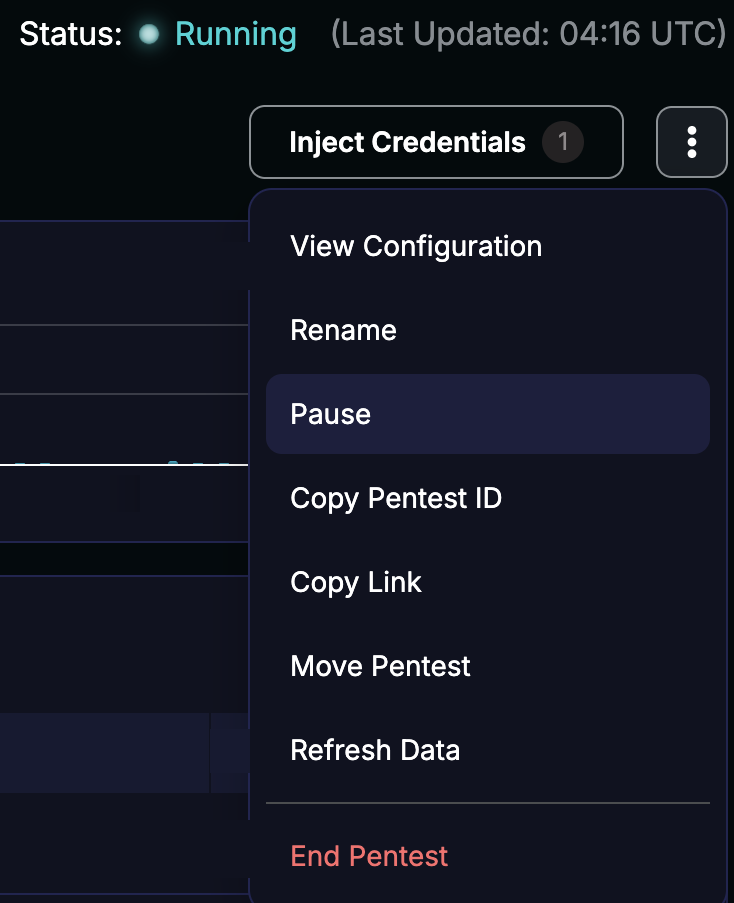
You can pause or stop a running WebApp test from its Real-Time View > Actions () menu.
Expected Logs and Traffic Patterns
WebApp testing typically runs in two broad phases. The first emphasizes enumeration and route discovery, and might resemble accelerated application traffic. The second emphasizes attack execution, and might produce repeated requests to the same URLs and parameters with varied payloads. The attack phase can trigger SOC (Security Operations Center) alerts, WAF (Web Application Firewall) rules, or rate limits.
Traffic Allowlisting
You can allowlist external applications retrieving NodeZero's testing source IP before launching a test, and adding that address or range to the appropriate WAF or perimeter allowlist. NodeZero recommends allowlisting when your goal is to test underlying application behavior, rather than to measure whether perimeter controls block commodity payloads.
Agents in WebApp Tests
NodeZero's core attack engine is grounded in graph-based reasoning and deterministic attack logic. In most pentests, scoped AI agents support specific tasks, such as application exploration, business-logic analysis, risk prioritization, and data analysis.
In every WebApp test, AI agents perform bounded tasks such as crawling, authentication, and session management via TOTP (time-based one-time passwords). WebApp tests also use Extended Agents, described just below. Both types of agents operate within deterministic guardrails that keep tests production-safe.
Extended Agents
Extended Agents are AI-driven WebApp testing components that add a higher level of adaptive reasoning to explore applications more deeply.
Standard testing follows defined attack methods: it discovers routes, applies known discovery checks and payloads, and validates exploitable behavior. Extended Agents use observations from the target application to decide which areas to investigate next. They design follow-up requests accordingly using specialist agents. This helps identify complex behavior – including some business-logic weaknesses – that fixed test plans might not anticipate.
Extended Agents remain subject to your defined application scope, testing rules, and safety controls. They are not unrestricted or general-purpose agents. Because their behavior is exploratory, results can vary between runs. Extended Agents run by default on every WebApp test, in both production and non-production environments.
Keeping Agentic Testing Production-Safe
You control a WebApp test's overall behavior by defining your application's scope, testing rules, and corresponding HTTP methods. Guardrails constrain every action the test takes, whether a standard check runs it or an agent proposes it. A model assesses each action's risk, and deterministic code enforces the result. Routes that NodeZero skips based on assessed risk appear in your test results, where you can decide whether to add them to future test runs.
Guardrails keep activity in scope, limit unsafe behavior, and prevent destructive actions. However, production-safe does not mean that testing makes no changes. Depending on the rules you select, a test might create accounts, submit posts, generate test data, or leave stored payloads. NodeZero logs these artifacts in real time and for post-op review, helping you supplement NodeZero's automated cleanup where necessary.
We encourage you to:
-
Coordinate testing with application owners and your SOC and WAF teams.
-
Review your selected methods before launching a test.
-
Review the log of artifacts after the test.
Starting Safely with Agentic Testing
To confidently apply agentic testing, Horizon3 recommends the following progression:
-
Start with a staging or non-production application where possible.
-
If you do start with a production application, select a single externally facing application, and run the test without credentials. This approximates the access available to an unauthenticated attacker.
-
Allowlist NodeZero traffic where a WAF would otherwise block testing.
-
Review the results and artifacts from this initial test.
-
Add credentials to expand into authenticated coverage, starting with the least-privileged role before adding higher-privileged roles.
-
To explore internal applications, deploy a NodeZero Runner that has network connectivity to the target and ongoing internet access.
Guardrails and Ephemerality
Wherever Horizon3 uses AI models, inference runs either through Horizon3-controlled infrastructure or through AWS Bedrock within Horizon3's AWS boundary. Horizon3 does not send raw customer data to external model providers or their APIs. We do not use customer data to train models – with the exception of tuning or training customer-specific models, by customer request, which are shared only with that customer.
Each NodeZero assessment runs in an isolated container. We retain sanitized results for customer access, but we destroy the test container after completion. Horizon3 may retain raw operational logs for up to five days in an internal S3 bucket for troubleshooting by a small group of privileged engineers, after which all sensitive data is scrubbed or destroyed.