ServiceNow VR Setup Guide
This guide covers how to configure an integration that pushes vulnerability data from NodeZero to a ServiceNow Vulnerability Response (VR) module. The steps below are performed by (respectively) a ServiceNow and a NodeZero administrator. It includes the following major sections:
- How This Integration Works
- Prerequisites
- Run the Setup Script
- Create a Service Account
- Set Up Authentication
- Configure CI Matching
- Configure Integration in NodeZero
- What NodeZero Writes
- Verify the Initial Sync
- Using the NodeZero Integration
ServiceNow VR replaces ServiceNow Ticketing
This enhanced push integration replaces our earlier ServiceNow Ticketing integration, which NodeZero no longer supports.
How This Integration Works
The ServiceNow VR integration automatically pushes all weaknesses in your Vulnerability Management Hub (VMH) associated with hosts into ServiceNow's Vulnerability Response module.
The first sync between NodeZero and ServiceNow sends your all weakness series that is already in VMH. Each completed pentest after that triggers a delta sync as VMH gets updated – for new weaknesses and status changes only.
Every push includes the host attributes that Servicenow VR needs to match each finding to an existing Configuration Item in its CMDB (Configuration Management Database). These matches – using business rules and CI lookup rules – enable the resulting Vulnerable Items (VIs) to flow through ServiceNow VR's native auto-assignment and remediation processes.
What the Integration Doesn't Do
Bear in mind certain purposes that this integration was not designed to fulfill:
- No round-trips. Each sync is one-way only (NodeZero → ServiceNow). Nothing is read back.
- Never reopens a closed VI. (A regressed weakness becomes a new VI, per ServiceNow VR's out-of-the-box conditions.)
- Skips non-host findings by default. (Examples include domain credentials and cloud resources.)
Prerequisites
- A ServiceNow instance with the Vulnerability Response module installed.
- Admin access on the ServiceNow instance.
- Ability to run Background Scripts (System Definition > Scripts > Background) within ServiceNow.
- Admin access on the NodeZero instance.
Run the Setup Script
A single idempotent setup script (provided below) provisions all the SecOps configuration elements that NodeZero needs — the dedicated integration role, ACLs (access control lists), the integration definition and instance, the severity mapping, and three business rules.
Run this script before you create the service account in Create a Service Account later in this procedure. The script creates the sn_vul.nodezero_integration role that you'll grant to the service account.
How to Run the Script
- Click to expand the script below.
- Copy its contents.
- In ServiceNow, navigate to System Definition > Scripts - Background.
- Set the scope drop-down (next to the
Run Script button) to Global. - Paste the script into the editor.
- Click Run Script.
Click to expand/collapse listing: snow-setup.js
/**
* NodeZero ServiceNow VR Integration — setup script (v2.1.0)
*
* Run from: System Definition → Scripts - Background (scope: Global).
* Idempotent — safe to re-run. Prints a summary at the end.
*
* Creates: dedicated `sn_vul.nodezero_integration` role (inherits
* `sn_vul.vulnerability_admin`), integration definition + instance,
* 6 ACLs + role grants (minimal validated set),
* 5 severity map rows, 3 business rules
* (CI match trigger via CILookupUtil + DI→VI cascades).
*
* Does NOT create: service account (credentials) or CI Lookup Rules
* (customer-designed against their CMDB). See Customer Setup Guide.
*
* Kept ES5-compatible (no template literals / arrow functions / let-const)
* so it runs on older SNOW Background Script engines without ES2021 mode.
*/
(function () {
    var VERSION = '2.1.0';
    var INTEGRATION_NAME = 'NodeZero';
    var INTEGRATION_ID = 'com.horizon3.nodezero';           // stable programmatic key for the integration definition
    var ROLE_NAME_BASE = 'sn_vul.vulnerability_admin';      // OOTB role we inherit from
    var ROLE_NAME_NZ = 'sn_vul.nodezero_integration';       // dedicated role granted to the integration service account

    var stats = { created: 0, skipped: 0, updated: 0, errors: 0 };
    var log = function (m) { gs.print('[NZ setup] ' + m); };
    var warn = function (m) { gs.warn('[NZ setup] ' + m); stats.errors++; };

    log('NodeZero setup script v' + VERSION + ' — starting');

    // ------------------------------------------------------------------ helpers

    function lookupSysId(table, field, value) {
        var gr = new GlideRecord(table);
        gr.addQuery(field, value);
        gr.setLimit(1);
        gr.query();
        return gr.next() ? gr.getUniqueValue() : null;
    }

    // lookup: string (addEncodedQuery) OR object {field: value} (addQuery per key).
    // Use object form when any value contains '^' (SNOW's AND separator).
    function upsert(table, lookup, fields, label) {
        try {
            var gr = new GlideRecord(table);
            if (typeof lookup === 'string') gr.addEncodedQuery(lookup);
            else for (var lk in lookup) gr.addQuery(lk, lookup[lk]);
            gr.setLimit(1);
            gr.query();
            if (gr.next()) {
                var changed = false;
                for (var k in fields) {
                    var cur = String(gr.getValue(k) || '');
                    var des = fields[k] === true ? '1'
                            : fields[k] === false ? '0'
                            : String(fields[k]);
                    if (cur !== des) { gr.setValue(k, fields[k]); changed = true; }
                }
                if (changed) {
                    gr.update(); stats.updated++;
                    log('UPDATED ' + label + ' (' + gr.sys_id + ')');
                } else {
                    stats.skipped++;
                    log('SKIPPED ' + label + ' — already matches (' + gr.sys_id + ')');
                }
                return gr.getUniqueValue();
            }
            var ins = new GlideRecord(table);
            ins.initialize();
            for (var f in fields) ins.setValue(f, fields[f]);
            var sysId = ins.insert();
            if (sysId) { stats.created++; log('CREATED ' + label + ' (' + sysId + ')'); return sysId; }
            warn('Insert returned no sys_id for ' + label); return null;
        } catch (e) { warn('Error on ' + label + ': ' + e); return null; }
    }

    function grantRole(aclSysId, roleSysId, label) {
        try {
            var gr = new GlideRecord('sys_security_acl_role');
            gr.addQuery('sys_security_acl', aclSysId);
            gr.addQuery('sys_user_role', roleSysId);
            gr.setLimit(1); gr.query();
            if (gr.next()) {
                stats.skipped++;
                log('SKIPPED role grant on ' + label + ' — already present');
                return;
            }
            var ins = new GlideRecord('sys_security_acl_role');
            ins.initialize();
            ins.setValue('sys_security_acl', aclSysId);
            ins.setValue('sys_user_role', roleSysId);
            if (ins.insert()) { stats.created++; log('CREATED role grant on ' + label); }
            else warn('Failed to grant role on ' + label);
        } catch (e) { warn('Error granting role on ' + label + ': ' + e); }
    }

    // ---------------------------------------------------------- resolve scopes

    var scopeVR = lookupSysId('sys_scope', 'scope', 'sn_vul');
    var scopeSecCmn = lookupSysId('sys_scope', 'scope', 'sn_sec_cmn');
    var roleVulAdmin = lookupSysId('sys_user_role', 'name', ROLE_NAME_BASE);
    if (!scopeVR || !scopeSecCmn || !roleVulAdmin) {
        gs.error('[NZ setup] FATAL — could not resolve required scopes or role. ' +
            'Is Vulnerability Response installed? Aborting.');
        return;
    }
    log('Resolved scopes: VR=' + scopeVR + ', SecCmn=' + scopeSecCmn +
        ', role ' + ROLE_NAME_BASE + '=' + roleVulAdmin);

    // -------------------------------------------------- NodeZero Integration role
    // Dedicated role granted to the integration service account. Inherits
    // sn_vul.vulnerability_admin (so the service account gets the standard VR
    // permissions) and on top of that receives the NodeZero-specific table
    // write ACLs provisioned below. Customer assigns this role to the service
    // account instead of granting sn_vul.vulnerability_admin directly, so the
    // integration's privileges can be scope-tracked under one named role.

    log('--- Role ---');
    var roleNodeZero = upsert('sys_user_role', {name: ROLE_NAME_NZ}, {
        name: ROLE_NAME_NZ,
        description: 'Granted to the NodeZero integration service account. ' +
            'Inherits ' + ROLE_NAME_BASE + ' for read/write on standard VR tables; ' +
            'ACLs provisioned by snow-setup.js add the NodeZero-specific writes.',
        sys_scope: scopeVR
    }, 'role ' + ROLE_NAME_NZ);
    if (!roleNodeZero) {
        gs.error('[NZ setup] FATAL — could not provision NodeZero role. Aborting.');
        return;
    }

    // Inheritance: nodezero_integration contains vulnerability_admin
    (function () {
        var gr = new GlideRecord('sys_user_role_contains');
        gr.addQuery('role', roleNodeZero);
        gr.addQuery('contains', roleVulAdmin);
        gr.setLimit(1); gr.query();
        if (gr.next()) {
            stats.skipped++;
            log('SKIPPED role inheritance ' + ROLE_NAME_NZ + ' contains ' + ROLE_NAME_BASE + ' — already present');
            return;
        }
        var ins = new GlideRecord('sys_user_role_contains');
        ins.initialize();
        ins.setValue('role', roleNodeZero);
        ins.setValue('contains', roleVulAdmin);
        if (ins.insert()) {
            stats.created++;
            log('CREATED role inheritance: ' + ROLE_NAME_NZ + ' contains ' + ROLE_NAME_BASE);
        } else {
            warn('Failed to create role inheritance');
        }
    })();

    // ---------------------------------------------------- Integration Definition

    log('--- Integration Definition ---');
    var integrationDefSysId = upsert('sn_sec_int_integration',
        'id=' + INTEGRATION_ID, {
            name: INTEGRATION_NAME,
            id: INTEGRATION_ID,
            source: INTEGRATION_NAME,
            integration_type: 'MANUAL',
            is_reapply_ci_lookup_supported: true,
            is_auto_close_supported: false,
            ire_source_name: 'VR-NodeZero',
            configurable: true,
            short_description: 'NodeZero pentest vulnerability data from Horizon3.ai'
        }, 'integration definition');
    if (!integrationDefSysId) {
        gs.error('[NZ setup] FATAL — integration definition could not be created. Aborting.');
        return;
    }

    // ------------------------------------------------------ Integration Instance

    log('--- Integration Instance ---');
    upsert('sn_sec_int_impl',
        'name=' + INTEGRATION_NAME + '^integration=' + integrationDefSysId, {
            name: INTEGRATION_NAME,
            integration: integrationDefSysId,
            active: true,
            description: 'NodeZero pentest vulnerability data from Horizon3.ai'
        }, 'integration instance');

    // -------------------------------------------------------------------- ACLs
    // Identification: our ACLs are the only ones that grant the NodeZero role
    // on this exact (name, operation, scope). Lookup is a JOIN against
    // sys_security_acl_role — SNOW's ACLDescriber regenerates the description
    // field after role grants, so a description marker wouldn't survive.

    log('--- ACLs ---');
    // Minimal set: inherited vulnerability_admin already covers record-level
    // writes and most field writes; these add only what OOTB withholds.
    var ACLS = [
        // [name, operation, scope]
        ['sn_vul_third_party_entry',             'create', scopeVR],     // TPE record-create (OOTB denies)
        ['sn_vul_third_party_entry.*',           'write',  scopeVR],     // TPE field writes (OOTB .* restrictive)
        // bypasses the OOTB conditional write ACL (vulnerabilityISEMPTY) that
        // otherwise strips this field on insert; net-new ACL.
        ['sn_vul_vulnerable_item.vulnerability', 'create', scopeVR],     // let vulnerability survive insert
        ['sn_vul_vulnerable_item.src_ci',        'write',  scopeVR],     // DI<->VI link (OOTB field ACL restrictive)
        ['sn_sec_cmn_src_ci',                    'write',  scopeSecCmn], // DI record update; also gates DI field writes
        ['sn_sec_cmn_src_ci.source',             'write',  scopeSecCmn]  // DI `source` tag (OOTB specific ACL restrictive)
    ];

    function findAclByRoleGrant(aName, aOp, aScope) {
        var ar = new GlideRecord('sys_security_acl_role');
        ar.addQuery('sys_user_role', roleNodeZero);
        ar.addQuery('sys_security_acl.name', aName);
        ar.addQuery('sys_security_acl.operation', aOp);
        ar.addQuery('sys_security_acl.sys_scope', aScope);
        ar.setLimit(1);
        ar.query();
        return ar.next() ? ar.getValue('sys_security_acl') : null;
    }

    // Fallback: find our ACL directly if the role grant wasn't inserted yet
    // (e.g., a prior run crashed between ACL insert and role grant insert).
    // Without this, the next run would create a duplicate ACL.
    function findAclDirect(aName, aOp, aScope) {
        var gr = new GlideRecord('sys_security_acl');
        gr.addQuery('name', aName);
        gr.addQuery('operation', aOp);
        gr.addQuery('sys_scope', aScope);
        gr.setLimit(1);
        gr.query();
        return gr.next() ? gr.getUniqueValue() : null;
    }

    for (var i = 0; i < ACLS.length; i++) {
        var aName = ACLS[i][0], aOp = ACLS[i][1], aScope = ACLS[i][2];
        var label = 'ACL ' + aName + '/' + aOp;
        // Don't set `description` — SNOW's ACLDescriber auto-generates it from
        // the role grant and overwrites anything we set.
        var fields = {
            name: aName, operation: aOp, type: 'record',
            decision_type: 'allow', active: true,
            advanced: false, admin_overrides: false,
            sys_scope: aScope
        };
        var aclSysId = findAclByRoleGrant(aName, aOp, aScope);
        var roleGrantExists = aclSysId !== null;
        if (!aclSysId) aclSysId = findAclDirect(aName, aOp, aScope);
        if (aclSysId) {
            // Update existing ACL in place
            var gr = new GlideRecord('sys_security_acl');
            gr.get(aclSysId);
            var changed = false;
            for (var k in fields) {
                var cur = String(gr.getValue(k) || '');
                var des = fields[k] === true ? '1'
                        : fields[k] === false ? '0'
                        : String(fields[k]);
                if (cur !== des) { gr.setValue(k, fields[k]); changed = true; }
            }
            if (changed) {
                gr.update(); stats.updated++;
                log('UPDATED ' + label + ' (' + aclSysId + ')');
            } else {
                stats.skipped++;
                log('SKIPPED ' + label + ' — already matches (' + aclSysId + ')');
            }
            if (roleGrantExists) {
                stats.skipped++;
                log('SKIPPED role grant on ' + label + ' — already present');
            } else {
                // ACL existed from a prior half-completed run; fix the missing role grant
                grantRole(aclSysId, roleNodeZero, label);
            }
        } else {
            // Create new ACL and grant role
            var ins = new GlideRecord('sys_security_acl');
            ins.initialize();
            for (var f in fields) ins.setValue(f, fields[f]);
            aclSysId = ins.insert();
            if (aclSysId) {
                stats.created++;
                log('CREATED ' + label + ' (' + aclSysId + ')');
                grantRole(aclSysId, roleNodeZero, label);
            } else {
                warn('Insert returned no sys_id for ' + label);
            }
        }
    }

    // -------------------------------------------------------- Severity Mapping

    log('--- Severity Mapping ---');
    for (var sv = 1; sv <= 5; sv++) {
        upsert('sn_vul_severity_map',
            'source=' + INTEGRATION_NAME + '^source_value=' + sv, {
                source: INTEGRATION_NAME,
                source_value: String(sv),
                target_value: sv,
                integration_type: 'vr'
            }, 'severity map ' + sv + '→' + sv);
    }

    // --------------------------------------------------------- Business Rules
    // Lookup by name — unique per NodeZero BR and doesn't collide with OOTB BRs
    // that may share the same collection + filter_condition. Names kept ≤40
    // chars to avoid SNOW's name-field truncation.

    log('--- Business Rules ---');

    function installBR(collection, filter, name, when, onInsert, order, script, desc) {
        upsert('sys_script',
            { name: name }, {
                name: name, collection: collection, when: when,
                action_insert: onInsert, action_update: true,
                action_delete: false, action_query: false,
                active: true, advanced: true, order: order,
                filter_condition: filter, script: script, description: desc
            }, 'BR: ' + name.replace(/^NodeZero\s*—\s*/, ''));
    }

    var NL = '\n';

    // CILookupUtil calls discoveredItem.update() internally; reevaluate_ci
    // must be reset to false beforehand or that nested update re-fires this BR.
    installBR(
        'sn_sec_cmn_src_ci', 'reevaluate_ci=true',
        'NodeZero — run CI match immediately', 'async', true, 100,
        [
            "(function executeRule(current, previous /*null when async*/) {",
            "    if (current.source.integration.id + '' != '" + INTEGRATION_ID + "') return;",
            "    current.setValue('reevaluate_ci', false);",
            "    new sn_sec_cmn.CILookupUtil().processDiscoveredItem(current);",
            "})(current, previous);"
        ].join(NL),
        'When a NodeZero DI is inserted/updated with reevaluate_ci=true, run CI Lookup Rules immediately via CILookupUtil with OOTB default behavior. Unmatched DIs get a sn_sec_cmn_unmatched_ci placeholder linked as cmdb_ci, surfacing the host in the VR workspace.');

    // DI-side cascade — propagates cmdb_ci from a matched DI to its existing VIs.
    installBR(
        'sn_sec_cmn_src_ci', 'cmdb_ciISNOTEMPTY^cmdb_ciVALCHANGES^EQ',
        'NodeZero — DI→VI CI cascade (on DI)', 'after', false, 200,
        [
            "(function executeRule(current, previous /*null when async*/) {",
            "    if (current.source.integration.id + '' != '" + INTEGRATION_ID + "') return;",
            "    var vi = new GlideRecord('sn_vul_vulnerable_item');",
            "    vi.addQuery('src_ci', current.sys_id);",
            "    vi.setValue('cmdb_ci', current.getValue('cmdb_ci'));",
            "    vi.updateMultiple();",
            "})(current, previous);"
        ].join(NL),
        "When a NodeZero DI's cmdb_ci changes (e.g. matched by CI Lookup rule), cascade the CI reference to all VIs linked to this DI via src_ci.");

    // VI-side cascade — fills cmdb_ci on new VIs from their linked DI.
    installBR(
        'sn_vul_vulnerable_item', 'source=NodeZero^cmdb_ciISEMPTY^src_ciISNOTEMPTY',
        'NodeZero — DI→VI CI cascade (on VI)', 'before', true, 100,
        [
            "(function executeRule(current, previous /*null when async*/) {",
            "    var diCmdbCi = current.src_ci.cmdb_ci + '';",
            "    if (diCmdbCi) current.setValue('cmdb_ci', diCmdbCi);",
            "})(current, previous);"
        ].join(NL),
        "New NodeZero VIs arrive after their DI has been inserted and CI-matched. The DI-side cascade rule updates existing VIs when DI.cmdb_ci changes, but can't update VIs that don't exist yet. This rule fills in cmdb_ci on VI insert by dot-walking src_ci to cmdb_ci.");

    // ----------------------------------------------------------------- summary

    log('=====================================================');
    if (stats.errors > 0) {
        // Use gs.warn directly — the `warn` helper increments stats.errors.
        gs.warn('[NZ setup] !!!  SETUP DID NOT FULLY COMPLETE — ' + stats.errors + ' ERROR(S) !!!');
        gs.warn('[NZ setup] Scan the log above for "WARN" lines to see what failed.');
        gs.warn('[NZ setup] The script is idempotent: fix the cause and re-run to finish setup.');
    } else {
        log('NodeZero setup complete.');
    }
    log('Created: ' + stats.created + ' / Updated: ' + stats.updated +
        ' / Skipped: ' + stats.skipped + ' / Errors: ' + stats.errors);
    log('=====================================================');
    if (stats.errors === 0) log('Next: define CI Lookup Rules (see Customer Setup Guide).');
})();
What the Script Creates
-
Role:
sn_vul.nodezero_integration— dedicated role for the integration service account, inheritingsn_vul.vulnerability_adminfor the standard VR permissions. Create a Service Account grants this role to the service account. -
6 ACLs + role grants on the NodeZero data tables — each ACL granted to
sn_vul.nodezero_integration(notadmin_overrides), so the service account gets write access only via this specific role, rather than full admin override.
This is the minimal set: the inherited sn_vul.vulnerability_admin already covers record-level writes/updates and most field writes, so we only add what OOTB withholds:
sn_vul_third_party_entry— create (record-level) + write (*field-level)sn_vul_vulnerable_item— create on the vulnerability field (works around an OOTB conditional write ACL that strips it on insert) + write on the src_ci field (OOTB-restricted)sn_sec_cmn_src_ci— write (record-level + source field-level; the record-level grant also enables the other DI field writes)sn_sec_int_integrationrecord namedNodeZero(integration definition to which CI Lookup Rules are scoped).sn_sec_int_implrecord namedNodeZero, linked to the definition (integration instance that tags every Discovered Item).- 5 severity map rows (identity map, 1-to-1 on NodeZero's 1–5 scale).
- Three business rules on the CI matching path — installed on
sn_sec_cmn_src_ciandsn_vul_vulnerable_itemto trigger CI matching and cascade the CMDB (configuration management database) CI reference from Discovered Items to Vulnerable Items.
What the Script Does Not Create
- The service account — customer credentials (Create a Service Account below).
- CI Lookup Rules — these are customer-designed against your CMDB (Configure CI Matching below).
Script Output
Expected output on a first run:
[NZ setup] NodeZero setup script v2.1.0 — starting
[NZ setup] Resolved scopes: VR=..., SecCmn=..., role sn_vul.vulnerability_admin=...
[NZ setup] --- Role ---
[NZ setup] CREATED role sn_vul.nodezero_integration (...)
[NZ setup] CREATED role inheritance: sn_vul.nodezero_integration contains sn_vul.vulnerability_admin
[NZ setup] --- Integration Definition ---
[NZ setup] CREATED integration definition (...)
[NZ setup] --- Integration Instance ---
[NZ setup] CREATED integration instance (...)
[NZ setup] --- ACLs ---
[NZ setup] SKIPPED ACL sn_vul_third_party_entry/create — already matches (...)
[NZ setup] CREATED role grant on ACL sn_vul_third_party_entry/create
... (5 pre-existing OOTB ACLs: SKIPPED ACL + CREATED role grant)
[NZ setup] CREATED ACL sn_vul_vulnerable_item.vulnerability/create (...)
[NZ setup] CREATED role grant on ACL sn_vul_vulnerable_item.vulnerability/create
[NZ setup] --- Severity Mapping ---
[NZ setup] CREATED severity map 1→1 (...)
...
[NZ setup] --- Business Rules ---
[NZ setup] CREATED BR: run CI match immediately (...)
[NZ setup] CREATED BR: DI→VI CI cascade (on DI) (...)
[NZ setup] CREATED BR: DI→VI CI cascade (on VI) (...)
[NZ setup] =====================================================
[NZ setup] NodeZero setup complete.
[NZ setup] Created: 19
[NZ setup] Updated: 0
[NZ setup] Skipped: 5
[NZ setup] Errors:  0
[NZ setup] =====================================================
Script Results
5 of the 6 ACLs already exist OOTB on stock SecOps installs — the script SKIPS those ACL records and only creates the role grants linking them to sn_vul.nodezero_integration. The only net new ACL being created is sn_vul_vulnerable_item.vulnerability Counts mary vary slightly based on which OOTB records already exist on the target instance.
The script is idempotent. Re-running it produces Created: 0 / Updated: 0 / Skipped: 32 / Errors: 0. You can safely re-run it for verification, or to push script updates in future versions.
Do not rename script entities
The integration name NodeZero is a fixed backend contract, not a customer-configurable label. The NodeZero sync hard-codes it in multiple places — do not rename the integration definition, the instance, or other records that the script creates.
Create a Service Account
NodeZero connects to your ServiceNow instance via the REST Table API, using a dedicated service account. Authentication is via an API key (x-sn-apikey header).
- In your ServiceNow dashboard, navigate to User Administration > Users.
- Create a new user for the integration (e.g.,
nodezero_integration). - Save the record, then click Set Password (link below the form header) .
- Scroll to the Roles tab at the bottom of the user record.
- Click Edit.
- Add
sn_vul.nodezero_integration(created by the setup script in Run the Setup Script). - Save the service account.
This role inherits sn_vul.vulnerability_admin and adds the NodeZero-specific table write ACLs — together giving the integration the minimum permissions needed to create and update vulnerability records.
Set Up Authentication
Here, you will create a dedicated API key token for API access. (For detailed configuration steps in the ServiceNow UI, see ServiceNow's Configure API key – Token-based authentication topic.)
Service account access
Enabling the API key plugin might disable basic auth for the service account. Creating an Inbound Authentication Profile (below) mitigates this risk.
Activate the API Key Plugin
Navigate to to Admin Center > Application Manager, search for API Key and HMAC Authentication (com.glide.tokenbased_auth), and activate this plugin.
Create an Inbound Authentication Profile
- Navigate to System Web Services > API Access Policies > Inbound Authentication Profile.
- Select New.
- Select Create API Key Authentication profiles.
- Enter a name for the profile.
- Unlock the Auth parameter using the Lock button.
- Select the target record:
x-sn-apikeywith Type: Auth Header. - Lock the Auth parameter.
- Submit the profile.
Create the REST API Access Policy
- Navigate to System Web Services > API Access Policies > REST API Access Policies.
- Select New.
- Enter a name for the policy.
- From the REST API drop-down, select Table API.
- Select Apply to All Methods, Apply to All Resources, and Apply to All Versions.
- Leave Apply to All Tables unselected.
Select the Required Tables
Under the Tables related list, add the five tables that NodeZero needs:
sn_vul_third_party_entry(read/write).sn_vul_vulnerable_item(read/write).sn_sec_cmn_src_ci(read/write).sn_sec_int_impl(read — used to resolve the NodeZero integration instance).sn_vul_entry(read) — parent table of TPE/NVD (Third-Party Entry/National Vulnerability Database) entries. Used to detect pre-existing vulnerability entries before insert so the out-of-the-box "Avoid duplicate Vuln entry" business rule doesn't abort our TPE writes.
Submit the Profile
Under Inbound authentication profiles at the bottom, click to add a new row, add the profile created above in Create an Inbound Authentication Profile, and Submit the change.
Generate and Copy the API Key
- Navigate to System Web Services > API Access Policies > REST API Key.
- Select New.
- Set a name for the key.
- Select the Service Account name you created above in Create a Service Account.
- Submit the new key.
- Navigate to the row that shows this new key's name.
- Copy the generated token (click the Lock button to access it).
- Save the token to later submit to NodeZero in Configure Integration in NodeZero.
Configure CI Matching
NodeZero writes Discovered Items (DIs) with host attributes in the source_data JSON field (and an os column at the top level). ServiceNow's CI Lookup framework uses those attributes to match each DI to a Configuration Item in your CMDB. The matched CI reference then cascades down to every Vulnerable Item (VI) for that host via business rules installed in Run the Setup Script.
The matching rules themselves are yours to design — attributes, priority, and CI class scope depend on your CMDB. The integration- and cascade-side plumbing installed by the setup script is rule-agnostic.
Available Attributes
For each discovered host, NodeZero provides the following attributes inside source_data:
Attribute |
Notes |
|---|---|
ip_address |
Always available. |
host_name |
Hostname from endpoint discovery. |
dns_name / fqdn |
Available for most hosts. |
subnet |
CIDR notation in most cases (e.g., 10.0.0.0/24). A small fraction (~1%) might contain a bare IP address for certain endpoint types — CI lookup rules that strictly require CIDR should include a null/invalid fallback. |
name |
Subdomain/prefix from domain name, up to the first dot. Horizon3 recommends mapping CI lookup rules to match this value against the CMDB name value. |
dns_domain |
Domain name excluding any prefix. |
ldap_hostname |
AD-joined hosts only. |
mac_address |
Might not be available for most hosts — not recommended for CI matching. |
Operating System is provided as a top-level field (os) on the Discovered Item record, not inside source_data.
Example: AD-Joined Windows Server (All Attributes)
{
  "ip_address": "192.168.1.10",
  "host_name": "dc01.corp.example.com",
  "dns_name": "dc01.corp.example.com",
  "fqdn": "dc01.corp.example.com",
  "ldap_hostname": "dc01",
  "name": "dc01",
  "dns_domain": "corp.example.com",
  "subnet": "192.168.1.0/24",
  "mac_address": "00:50:56:84:46:30"
}
Example: Host with Differing Name Sources
{
  "ip_address": "10.20.30.40",
  "host_name": "app-server.internal.net",
  "dns_name": "ip-10-20-30-40.ec2.internal",
  "fqdn": "ip-10-20-30-40.ec2.internal",
  "ldap_hostname": "app-server",
  "name": "ip-10-20-30-40",
  "dns_domain": "ec2.internal",
  "subnet": "10.20.30.0/24"
}
Example: Linux Host (No AD, No MAC)
{
  "ip_address": "10.50.60.70",
  "host_name": "web-proxy-01.internal",
  "dns_name": "web-proxy-01.internal",
  "fqdn": "web-proxy-01.internal",
  "subnet": "10.50.60.0/23",
  "name": "web-proxy-01",
  "dns_domain": "internal"
}
Define CI Lookup Rules
How NodeZero Discovered Items get matched to Configuration Items in your CMDB is your call — which attributes to trust, in what priority order, against which CI classes or custom fields, depends on your data model and the quality of each attribute in your environment. Rules live in sn_sec_cmn_ci_lookup_rule.list, each scoped to the NodeZero integration definition created by the setup script.
Source fields available (keys in the DI's source_data JSON, see Available Attributes): fqdn, dns_name, ip_address, host_name, ldap_hostname, subnet, mac_address.
Recommended Starter Rules - Sample (tune or replace based on your CMDB):
| Name | Order | Lookup Method | Active | Source | Source Field |
Description | Search on CI Table | Search on CI Field |
|---|---|---|---|---|---|---|---|---|
| FQDN - NodeZero Ingest | 100 | field_matching |
✔️ | NodeZero |
fqdn |
Most specific, usually highest-trust | Configuration Item [cmdb_ci] |
Fully qualified domain name |
| IP Address - NodeZero Ingest | 200 | field_matching |
✔️ | NodeZero |
ip_address |
Auto-promotes to the owning CI via owned_by_cmdb_ci / nic |
IP Address [cmdb_ci_ip_address] |
IP Address |
| Hostname - NodeZero Ingest | 300 | field_matching |
✔️ | NodeZero |
host_name |
Fallback when FQDN/IP aren't reliable | Configuration Item [cmdb_ci] |
Name |
| Name - NodeZero Ingest | 400 | field_matching |
✔️ | NodeZero |
name |
Short host name split from FQDN | Configuration Item [cmdb_ci] |
Name |
| DNS Domain - NodeZero Ingest | 500 | field_matching |
✔️ | NodeZero |
dns_domain |
DNS domain split from FQDN | Configuration Item [cmdb_ci] |
DNS Domain |
Lower Order = higher priority. The first rule that produces a match wins; subsequent rules don't run for that DI.
Rules Are Changeable
The NodeZero integration itself does not depend on these rules — the match-trigger business rule installed by the setup script iterates whatever rules exist for the NodeZero source. Add, remove, or rewrite rules at any time without touching the rest of the configuration.
Unmatched DI Behavior
DIs for hosts that don't match a CMDB CI get a placeholder record created in sn_sec_cmn_unmatched_ci and linked as the DI's cmdb_ci. These placeholders surface unmatched hosts in the VR workspace so that they can be found and resolved. To resolve a placeholder:
-
Create or discover the real CI in your CMDB; the next NodeZero sync will match the DI to it (because every upsert resets
reevaluate_ci = true); or: -
Match the DI manually: set
cmdb_cidirectly on the DI, and setmatching_type = matched_manually.
Verify CI Matching
After the next NodeZero sync:
sn_sec_cmn_src_cifiltered bySource=NodeZero+Configuration item is not empty> count equals the number of NodeZero hosts that match a CMDB CI via your rules. Zero is legitimate if no CIs yet exist for NodeZero's hosts.sn_vul_vulnerable_itemfiltered by Source =NodeZero+Configuration item is not empty> count grows as matched DIs' VIs inherit the CI reference.- Spot-check a VI in the UI — the Configuration item field should resolve to the matched CMDB CI.
- As your CMDB grows (via Discovery or manual additions), re-running a NodeZero sync or setting
reevaluate_ci= true on unmatched DIs picks up the newly available CIs.
Troubleshooting
DIs stay unmatched after a sync:
- Confirm the
sn_sec_int_implrecord has its Integration field pointing at the NodeZero definition (both created by the setup script; verify viasn_sec_int_impl.list). - Confirm each lookup rule's Source field points at the NodeZero integration definition (not the instance).
- Confirm DIs carry
reevaluate_ci= true (NodeZero sets this automatically on every upsert). - Confirm the NodeZero — run CI match immediately business rule is active.
VI Configuration item empty even though the DI is matched:
- Confirm both NodeZero — DI > VI CI cascade business rules are active (one scoped to
sn_sec_cmn_src_ci, one tosn_vul_vulnerable_item). - Confirm the VI's
src_cipoints at the DI (NodeZero sets this automatically).
Placeholder CI records in sn_sec_cmn_unmatched_ci :
- Expected behavior — the setup script's CI matching business rule calls
CILookupUtil.processDiscoveredItem(current)with the ServiceNow out-of-the-box default. When no CI Lookup Rule matches, the framework creates an unmatched CI placeholder via IRE, which surfaces unmatched hosts in the VR workspace. See Unmatched DI Behavior for resolution steps.
Configure Integration in NodeZero
In the NodeZero Portal, use the steps below to configure the ServiceNow VR Integration to connect with your ServiceNow instance.
-
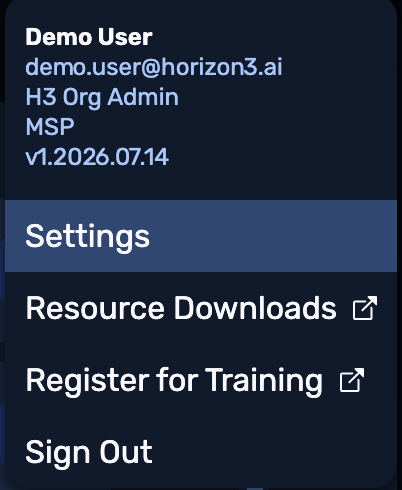
Click the user profile button at the top right, and from the resulting drop-down, select Settings.
-
From the Portal's submenu, select Integrations or Integrations (Legacy).
-
Locate the ServiceNow Vulnerability Response tile and click its
+button.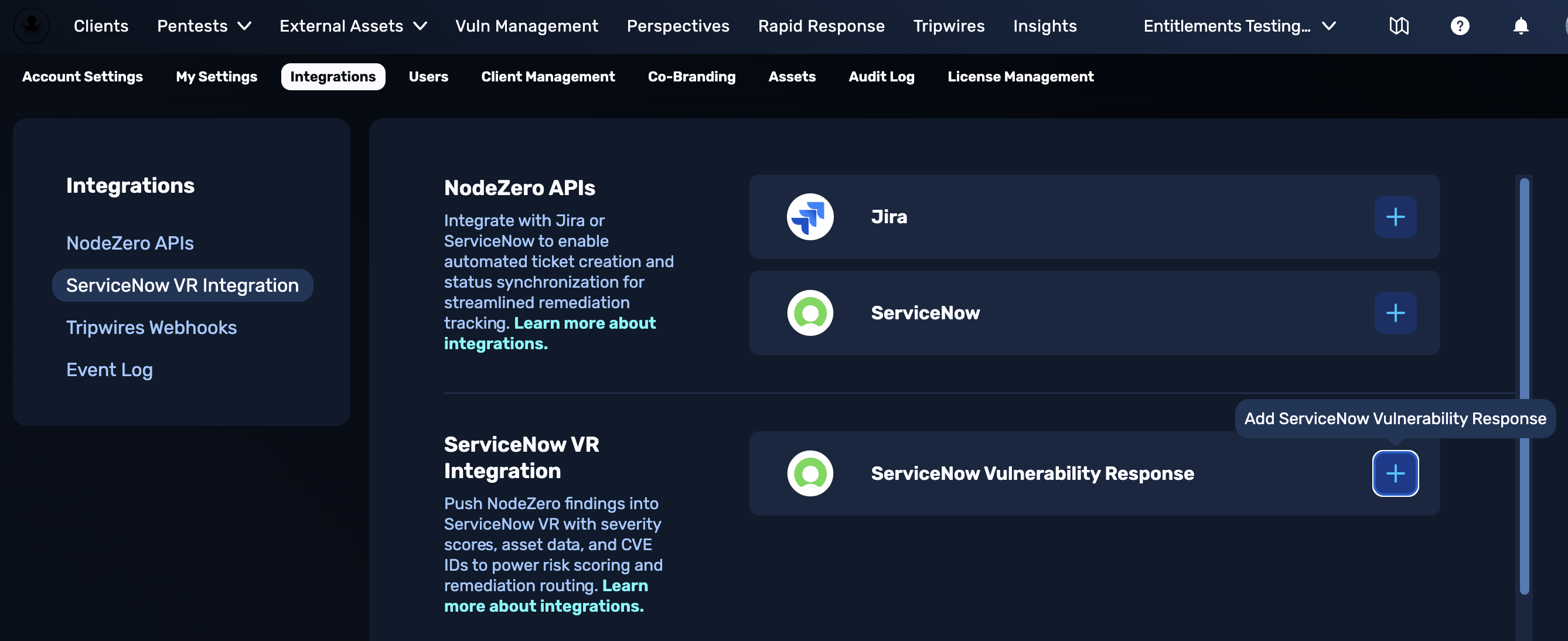
-
Enter your ServiceNow instance's URL, username, and token. See guidance in the table below.
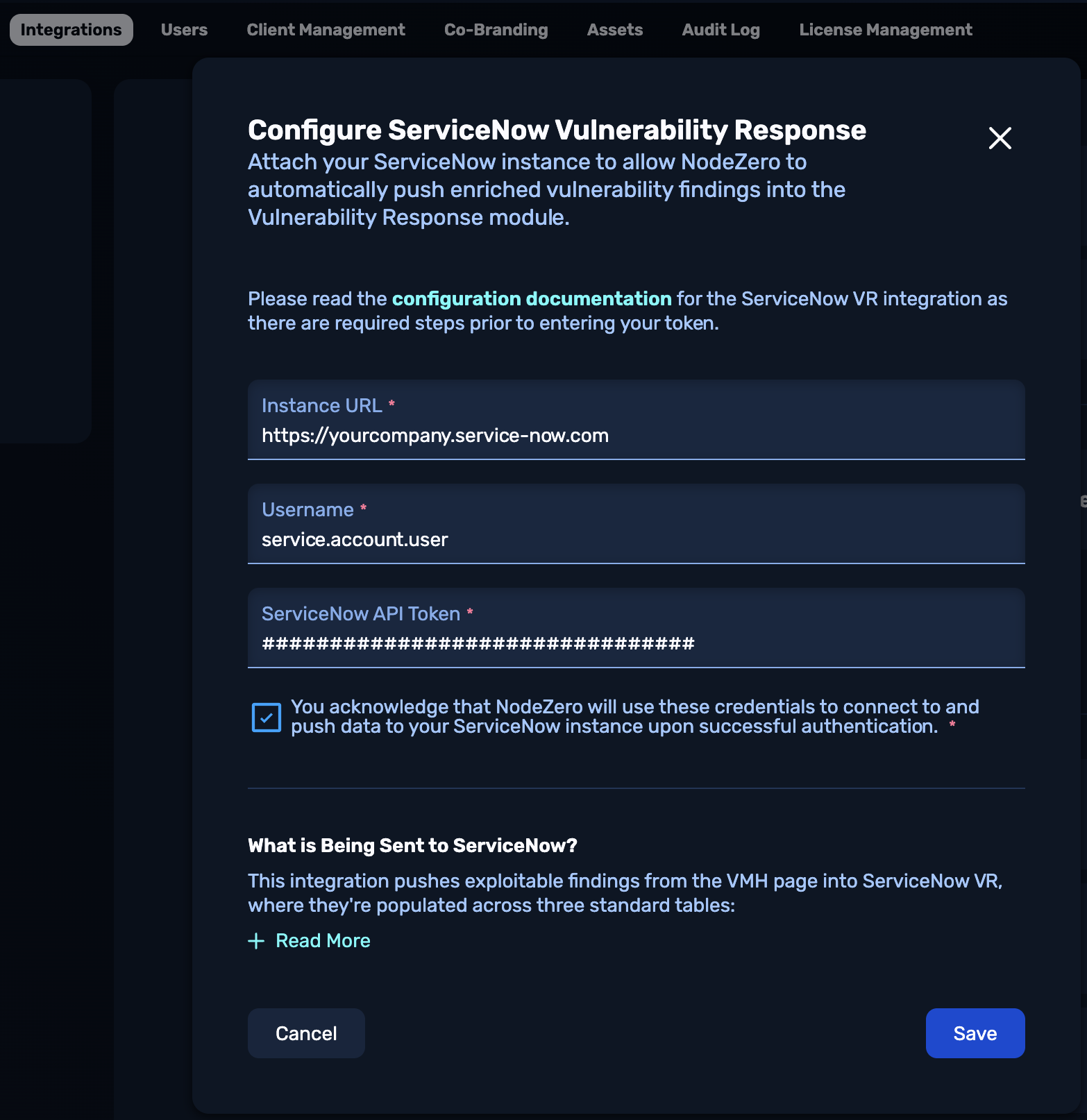
Field Value Instance URL URL to your ServiceNow instance (e.g., https://yourcompany.service-now.com)Service account username The username you assigned earlier in Create a Service Account. API key token The token you generated earlier in Generate and Copy the API Key. -
Select the You acknowledge... check box, then click Save.
Credentials encryption
Credentials are encrypted at rest using per-client AWS KMS (Key Management Service) keys.
What NodeZero Writes
NodeZero pushes data to three ServiceNow tables:
| Table | What |
|---|---|
sn_sec_cmn_src_ci |
Discovered Items — one per unique host. Contains IP, hostname, DNS, MAC, subnet for CI matching. |
sn_vul_third_party_entry |
Vulnerability Definitions — one per unique CVE or NodeZero (H3 taxonomy) finding. Contains severity, CVSS scores, description, solution. |
sn_vul_vulnerable_item |
Vulnerable Items — one per vulnerability-on-host combination. Links to the discovered item and vulnerability definition. |
Data is synced automatically after each pentest completes. Each sync is idempotent — existing records are updated, new records are created, and no duplicates are produced.
By default, NodeZero pushes only findings that can be linked to a host. Findings without a host context (e.g., domain-level credentials, cloud resources, dangling DNS) are filtered out, so that your ServiceNow vulnerability view stays actionable. Customers whose environments rely on non-host findings can opt in to pushing them as vulnerable items without a src_ci link — ask your Horizon3 representative to enable this.
Verify the Initial Sync
After the first NodeZero sync, verify in your ServiceNow instance:
- Vulnerable Items: type
sn_vul_vulnerable_item.list> filter bySource=NodeZero. - Vulnerability Definitions: type
sn_vul_third_party_entry.list> filter bySource=NodeZero. - Discovered Items: type
sn_sec_cmn_src_ci.list> filter bySource=NodeZero.
Check that:
- Vulnerability definitions have severity, CVSS scores, and descriptions populated.
- Vulnerable items link to both a vulnerability definition and a discovered item.
- Discovered items have
source_datapopulated with host attributes. - Risk scores vary based on severity (not all 20 or all 0).
- For DIs that matched a CMDB CI, the linked Vulnerable Items have
cmdb_cipopulated as well (see Verify CI Matching for CI matching-specific verification).
If fields appear blank, or all risk scores are identical, the setup script might not have completed cleanly. Re-run it (idempotent) and check the log for errors.
If Discovered Items don't appear when filtering by Source = NodeZero, verify that the Integration Instance (sn_sec_int_impl record named NodeZero) exists and is linked to the NodeZero integration definition. The setup script creates both; re-running it restores missing state.
Using the NodeZero Integration
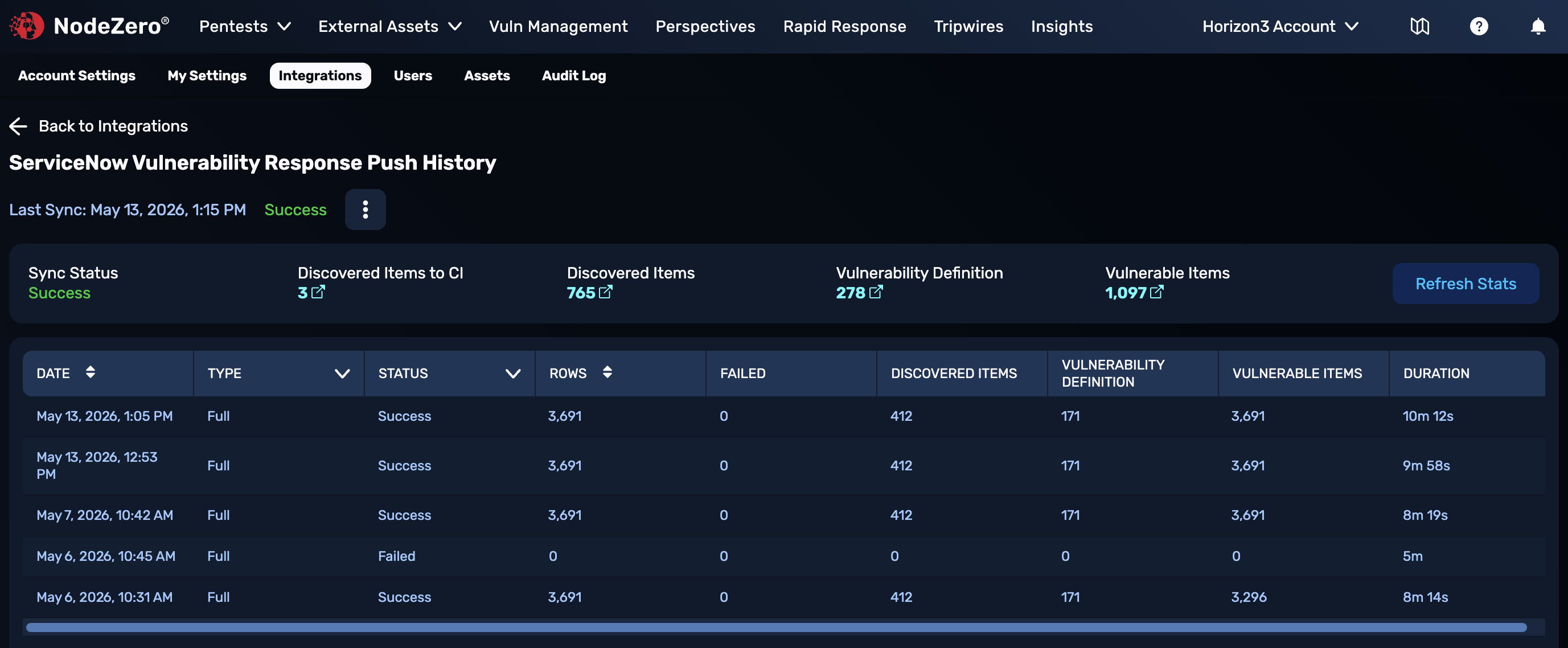
After the integration performs a successful sync with your ServiceNow instance, the ServiceNow Vulnerability Response tile will confirm this status.
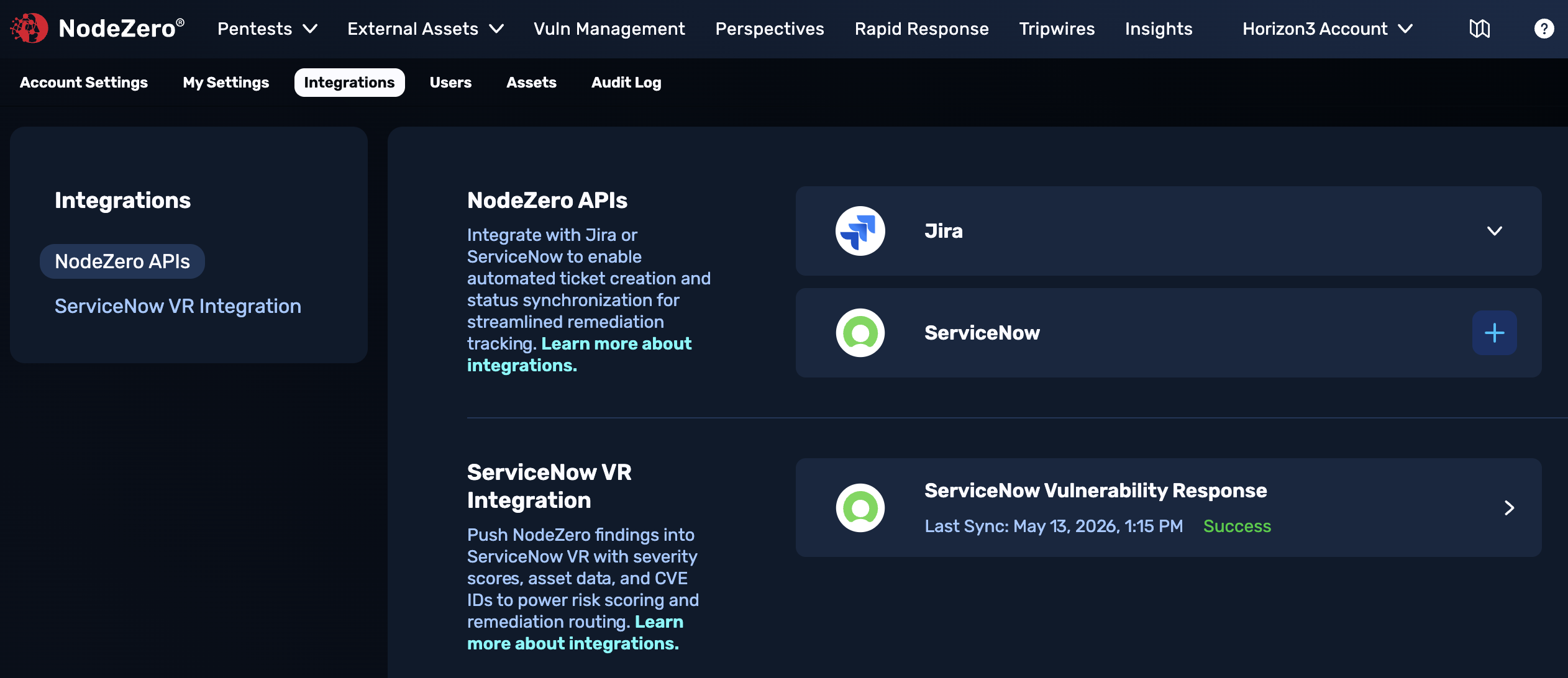
Click anywhere on the tile to open the dashboard shown below. This summarizes past pushes to ServiceNow, with metadata and links for discovered vulnerabilities and vulnerable items.